Pixelcraft Military: Commanding Attention with Color
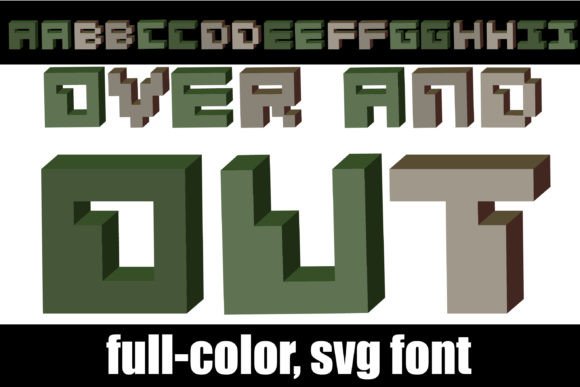
If your design work feels a bit like it’s stuck in neutral, it might be time to add some tactical flair. We’re talking about typography that does more than just spell out words—it creates an atmosphere. Enter Pixelcraft Military, a typeface that blends the nostalgia of classic video game aesthetics with the structured, commanding presence of military design. It’s not just a font; it’s a toolkit for creators who want their text to stand at attention.
What makes this specific typeface a standout asset in a crowded creative market? It’s the marriage of two distinct worlds: the playful, blocky geometry of pixel art and the serious, earth-toned authority of military insignia. The result is a premium font that feels both retro and rugged. Whether you are designing a logo for a gaming clan, packaging for an outdoor adventure brand, or social media graphics that need to cut through the noise, this font offers a unique visual language.
The "Alt" Advantage: Unlocking Color Without Complexity
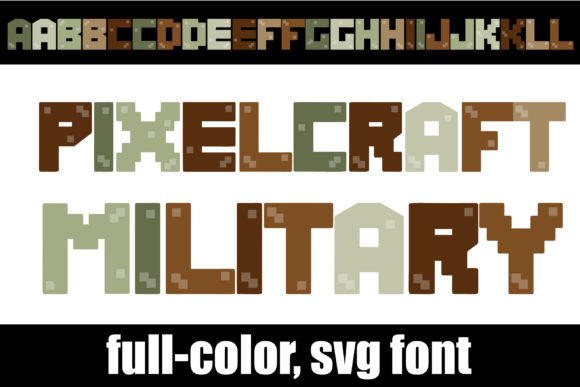
One of the most practical features of Pixelcraft Military is its use of OpenType full-color (SVG) technology. For the uninitiated, this sounds technical, but the application is incredibly user-friendly. This is a full-color font, meaning the glyphs are vectorized and contain color data directly within the file. You don’t need to layer shapes or manually color individual letters in Illustrator; the color is baked right in.
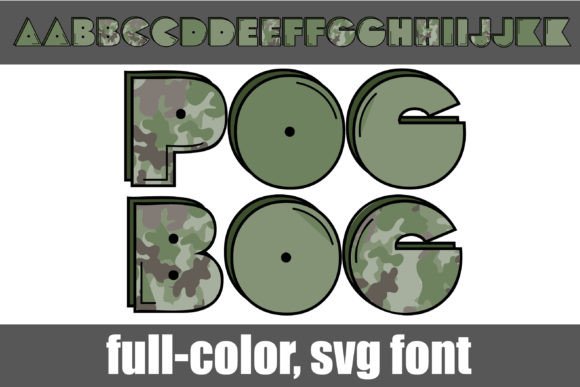
However, the true ingenuity lies in the "alt" version system. Each letter comes in multiple color variations. By simply using your system’s character map (FontBook on Mac or the Character Map utility on Windows), you can swap out individual letters to create a varied, textured look. Imagine a headline where every letter is a slightly different shade of olive drab, camouflage, or desert sand. This breaks up the monotony of standard text and gives your design a hand-crafted, chaotic energy that is perfect for creative font applications.
Compatibility and Installation: A Seamless Workflow
There is a common misconception that color fonts are difficult to install or use. In reality, Pixelcraft Military installs just like any standard .otf font. You simply add it to your font manager or control panel.
The caveat, of course, is software support. While standard programs will display the font as solid black (falling back to a standard vector outline), modern design software has caught up. If you are working in Adobe products, Silhouette Studio, Quark, or Inkscape, you will see the full-color magic immediately. This makes it a versatile addition to your design assets library, ensuring you can use it for high-end editorial design or simple logo design without compatibility headaches.
Strategic Applications: Where to Deploy This Typeface
Understanding the technical specs is one thing; knowing how to apply them to real-world projects is where the value lies. This isn't just a novelty font; it’s a strategic tool for brand identity.
- Gaming and Esports Branding: The pixel-style lettering is an obvious fit for the gaming industry. Use it for team logos, Twitch overlays, or merchandise like t-shirts and stickers. The military palette adds a layer of seriousness and competitiveness that generic 8-bit fonts lack.
- Outdoor and Adventure Packaging: If you are designing for a brand that sells camping gear, hiking boots, or rugged tech accessories, the military color scheme reinforces durability. It suggests that the product is built for the elements.
- Event Invitations and Posters: Planning a themed party, a paintball tournament, or a retro arcade night? This font sets the mood instantly. It reads as "event-specific" rather than generic, making it a powerful tool for marketing assets.
- Social Media Graphics: In the fast-scrolling environment of Instagram or TikTok, high-contrast, colorful text stops thumbs. The blocky nature of Pixelcraft Military ensures readability even at smaller sizes on mobile screens, making it excellent for social media graphics.
Design Principles: Pairing and Professionalism
While Pixelcraft Military is a showstopper, it is a display font. This means it is designed for impact, usually in headlines or short bursts of text. Using it for long-form body copy would likely hinder readability. Therefore, successful font pairing is essential.
To maintain a professional presentation, pair this bold typeface with a clean, neutral sans serif font or a simple serif font. For example, a geometric sans-serif for your body text will ground the playful nature of the pixel font, creating a balanced hierarchy. Avoid pairing it with overly ornate script fonts or handwritten fonts, as the visual styles will clash and create chaos rather than cohesion.
When testing your pairings, pay close attention to the "Alt" characters. Swapping colors can sometimes affect the visual weight of a word. Always proofread your design to ensure the message is clear. The goal is to use the font's personality to enhance the message, not obscure it.
Commercial Use and Scalability
For small business owners and entrepreneurs, licensing is a critical consideration. Always verify the commercial license of any premium font before using it in client work or on products for sale. Pixelcraft Military is built on vector technology (SVG), which means it is infinitely scalable. Whether you are printing a tiny logo on a pen or a massive banner for a trade show, the edges will remain crisp. This vector-based nature ensures that your brand identity remains consistent across all mediums, from web design to physical packaging design.
Ultimately, choosing a font like Pixelcraft Military is about injecting personality into your work. It moves beyond the safe, corporate look of standard system fonts and invites the viewer into a specific visual world. By leveraging its color capabilities and pairing it thoughtfully, you can create designs that are not only visually engaging but also strategically sound.